Posts

Document handling - ax 2012

Hi, please refer the below video to create word document with bookmark and dynamically pass the values to the bookmark from dynamics ax. (used the class -> Create a Microsoft Word document by using COM) https://www.youtube.com/watch?v=NVSxc2jg2iY For, programmatically handle the document handling https://www.youtube.com/watch?v=NVSxc2jg2iY https://community.dynamics.com/ax/b/axaptavsme/archive/2013/03/07/document-handling-via-x To show/hide the bookmark in word document template http://www.extendoffice.com/documents/word/848-word-show-hide-bookmarks.html Cool stuff. Thanks, Vijaykarthik
Ax 2012 R3 demo data & Test data Transfer Tool download

Hi, Interesting article to deploy the demo data into ax 2012 R3. refer the link below, http://dynamicsaxsharma.blogspot.com.au/2015/07/ax-2012-r3-demo-data-test-data-transfer.html Thanks, Vijaykarthik

EP (Enterprise portal) not working in Ax 2012

Image
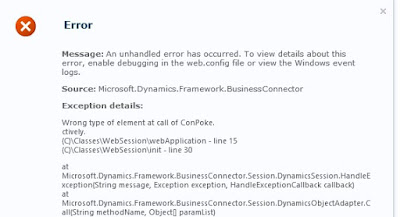
Hi, We have installed the EP in our UAT server and done the configuration. It has created a web site in Ax (system administration -> setup -> Enterprise portal -> websites). when we click the url, the  EP page is not loading, and it thrown the below error. Exception: Wrong type of element at call of conPoke (C)Classes\webSession\webApplication - line 15 (C)Classes\WebSession\init - line 30 To resolve the above error, we done the below (deleted the AUC files /client catch files). steps are, 1.        Stop AOS 2.        Use BC account login SharePoint server which EP cannot work. 3.        Go to BC user’s user profile : %USERPROFILE%\APPDATA\LOCAL 4.        Delete all .auc files. 5.        Start AOS. 6.        Try EP works or not. Note: Please enable the hidden items in s...

Top 10 issues discovered from Dynamics AX Code Review

Hi, Please refer the below link to discovered the top 10 issue in the Ax coding. must read. http://blogs.msdn.com/b/axinthefield/archive/2014/02/18/top-10-issues-discovered-in-the-dynamics-ax-code-review.aspx Thanks, Vijaykarthik

Import customer/vendor/Worker using Data import export framework in ax 2012 r3

Hi, To import the master data (like customer, vendor, worker..etc) by using Data import and export framework (DIXF) in Ax 2012 R3. Refer the below link for step by step explanation, http://shafeaa.blogspot.ae/2015/07/import-workers-using-data-import.html Thanks, Vijaykarthik

Excel add-in upload - General journal - Ax 2012 R3

Hi, The below link is explain the use of excel add-in to import the general journal header and lines. http://www.daxfinanceblog.com/dynamics-ax/2015/1/11/upload-a-general-journal-from-excel-in-dynamics-ax2012-r3 I followed and imported the same. It is using the standard web service (which is coming in out of box). No customization/job is required. Note: Please check the Data source for General ledger is available or not. if not you can create it (after registration of LedgerGeneralJournalService) "Document Data sources" is available in Org.admin -> setup -> Document management. Happy Importing. Thanks, Vijaykarthik

Shrink DataBase log file - Sql 2012

Hi, I had situation, when my log file size is increased and there is no space in my drive. so I could not able to login to Ax. I used the shrink data base file option to reduced the log file size. For that, I have done below steps, 1) stopped my AOS service 2) Open SQL 2012 management studio 3) To set the Recovery model =  "SIMPLE" for your DB. (my case AxDevDB) (Choose Your DB, right click and go to properties and then go to Option tab to see the recovery model) 4) Right click the DB and choose SHRINK -> File and choose the AXDevDB_log file and press ok. (it will reduce 99% of the log file size). 5) To set back the Recovery model = "FULL" for your DB. 6) Start the AOS Service. To run the SQL Script, use below, USE AxDevDB; GO -- Truncate the log by changing the database recovery model to SIMPLE. ALTER DATABASE AxDevDB SET RECOVERY SIMPLE; GO -- Shrink the truncated log file to 1 MB. DBCC SHRINKFILE (AxDevDB_Log, 1); GO -- Reset th...